
25 October 2026 · Release
Drawing MCP Server
Read, edit and view DWGs with AI. Keep drawings local, or work in ChatGPT and Claude.Ask your assistant to find objects, inspect layers and blocks, extract properties, or render a drawing. It queries the actual DWG data through the DWH engine.
View model space, layouts, and blocks in 2D. Explore model space in 3D with orbit, pan, and zoom in compatible MCP Apps clients. Other clients can request SVG or PNG renders.
No AutoCAD required. Supported property edits stay in memory; the source DWG is never overwritten.
- Local processing
- Your DWG files stay on your machine. The MCP server processes them locally without uploading them. For Codex, Claude Code, Cursor, VS Code, and Claude Desktop.
- Cloud processing
- Upload DWGs to the hosted server and work in ChatGPT or Claude (including Cowork). Also works with Codex, Claude Code, Cursor, VS Code, and Claude Desktop.
Quick start
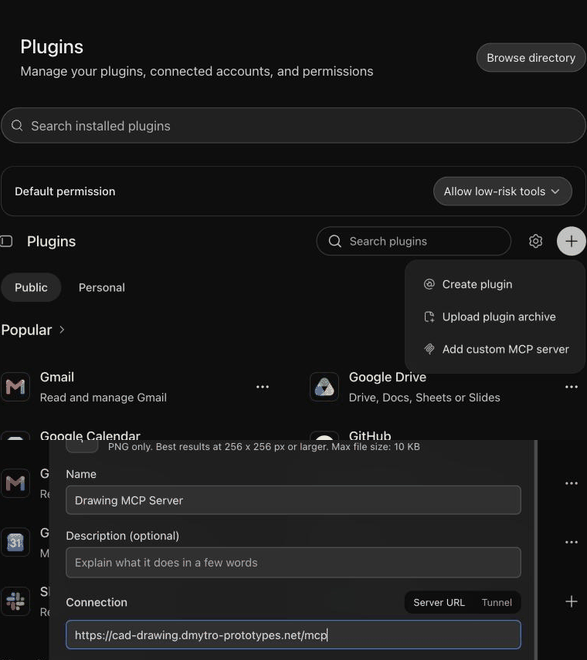
Settings → Plugins → Browse directory → + → Add custom MCP server, then sign in. Upload your DWG with the Drawing MCP file manager.
https://cad-drawing.dmytro-prototypes.net/mcp
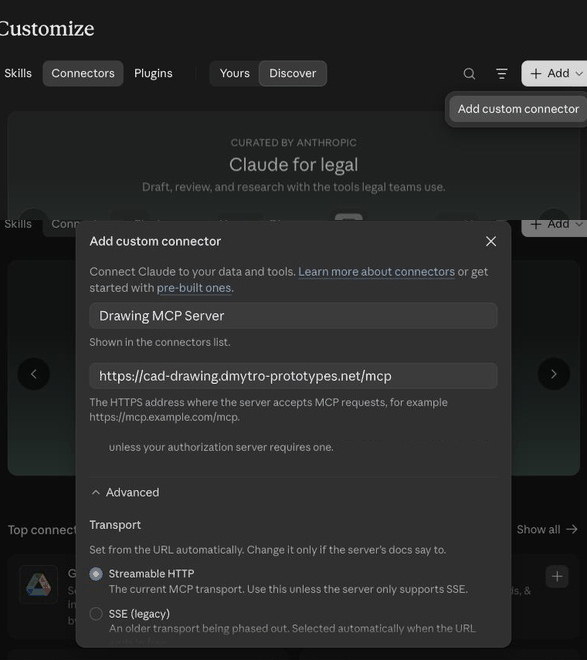
Customize → Connectors → + Add → Add custom connector. Paste the URL, keep Transport on Streamable HTTP, then sign in. Upload your DWG with the Drawing MCP file manager.
https://cad-drawing.dmytro-prototypes.net/mcp
Claude Desktop only · claude_desktop_config.json · Node.js 18+ · restart after editing
{
  "mcpServers": {
    "drawing-local": {
      "command": "npx",
      "args": [
        "-y",
        "@dmytro-prototypes/cad-drawing-mcp-server"
      ],
      "env": {
        "DRAWING_MCP_ALLOWED_ROOTS": "/absolute/path/to/your/home"
      }
    }
  }
}
Terminal · Node.js 18+ · grants access to your home folder
claude mcp add --scope user --transport stdio drawing-local --env DRAWING_MCP_ALLOWED_ROOTS="$HOME" -- npx -y @dmytro-prototypes/cad-drawing-mcp-server
Terminal · then use /mcp in Claude Code to sign in
claude mcp add --scope user --transport http drawing https://cad-drawing.dmytro-prototypes.net/mcp
Terminal · Node.js 18+ · grants access to your home folder
codex mcp add drawing-local --env DRAWING_MCP_ALLOWED_ROOTS="$HOME" -- npx -y @dmytro-prototypes/cad-drawing-mcp-server
Terminal · the second command opens browser sign-in
codex mcp add dwh --url https://cad-drawing.dmytro-prototypes.net/mcp
codex mcp login dwh
~/.cursor/mcp.json · Node.js 18+ · restart after editing
{
  "mcpServers": {
    "drawing-local": {
      "command": "npx",
      "args": [
        "-y",
        "@dmytro-prototypes/cad-drawing-mcp-server"
      ],
      "env": {
        "DRAWING_MCP_ALLOWED_ROOTS": "/absolute/path/to/your/home"
      }
    }
  }
}
~/.cursor/mcp.json · enable the server and sign in when prompted
{
  "mcpServers": {
    "drawing": {
      "url": "https://cad-drawing.dmytro-prototypes.net/mcp"
    }
  }
}
.vscode/mcp.json · Node.js 18+ · restart after editing
{
  "servers": {
    "drawing-local": {
      "type": "stdio",
      "command": "npx",
      "args": [
        "-y",
        "@dmytro-prototypes/cad-drawing-mcp-server"
      ],
      "env": {
        "DRAWING_MCP_ALLOWED_ROOTS": "/absolute/path/to/your/home"
      }
    }
  }
}
.vscode/mcp.json · start the server and follow the sign-in prompt
{
  "servers": {
    "drawing": {
      "type": "http",
      "url": "https://cad-drawing.dmytro-prototypes.net/mcp"
    }
  }
}
CAPABILITIES
What it can do
- cad.open_file
- Open a local DWG and inspect its contents and decode coverage.
- cad.query_objects
- Find objects by type, layer, block, layout, property, or text.
- cad.get_objects
- Read objects and their properties by handle.
- cad.describe_type
- Discover the readable and writable properties of an object type.
- cad.set_entity_properties
- Edit supported properties in memory without overwriting the source drawing.
- cad.list_render_views
- List model space, paper-space layouts, and individual blocks.
- cad.render_view
- Render a drawing view or selected region as SVG or PNG.
- cad.show_document
- Open the interactive 2D viewer, with model-space 3D in compatible MCP Apps clients.
- cad.show_files
- Upload, open, and manage stored drawings through the hosted file manager.
The viewer requires an MCP Apps client; other clients receive a PNG fallback. Render results include diagnostics for missing fonts and unsupported geometry. Property edits are session-only and discarded when the drawing closes.
DOWNLOADS
Prebuilt binaries
Release v0.1.1 for Windows, macOS Apple Silicon, and Linux x64 / ARM64.
macOS Apple Silicon
macOS 15+ · ARM64 · tar.gz · 3.1 MB
SHA-256
e339bd336294d14d353af548ecc7bf361ddd9be046b497fa379b3ae12f3286bc
Windows x64
Windows 10/11 · x64 · tar.gz · 3.7 MB
SHA-256
451c5cad815583fd860646d9fbc7b2b2b2a22fd399df75760ce9844d59383018
Linux x64
glibc 2.35+ · x64 · tar.gz · 3.6 MB
SHA-256
fdffba56aaab0d1dfba2e5a52a6efa37ada84760c2059cea630171a4e5e1982b
Linux ARM64
glibc 2.39+ · ARM64 · tar.gz · 3.3 MB
SHA-256
797c212ebb95e580e4b223d2ee5bdee49595317f336ba94874a16f5c09eb3120
Native downloads work without Node.js. macOS builds are Developer ID signed and notarized; Windows builds are Authenticode signed. Verify an archive against its SHA-256 checksum before unpacking, then follow the included installation guide.
The first 100 calls work without an account. After that, run npx -y @dmytro-prototypes/cad-drawing-mcp-server --login once to sign in through your browser; signed-in calls need internet access.